 WorkShift HQ
Connections and delivery
Integrations and schedule-sharing options
WorkShift HQ offers several ways to bring schedule context in or share updates out. Some need an owner to configure a provider; none should be mistaken for an unlisted native connector.

Square Appointments: view demand beside shifts
An eligible business can authorize Square Appointments so booking demand appears as a read-only overlay alongside the staff calendar. WorkShift HQ does not create, edit, cancel, or otherwise change Square bookings. Appointment display is limited to scheduling context and does not expose customer names, contact details, notes, or payments.
Connection requires a Square account that has completed Square Appointments onboarding and grants the required read scopes for appointments and team members; it does not depend on a Plus or Premium subscription tier for these reads. An owner must configure and authorize the connection, map the relevant Square locations and team members, and refresh or reconnect if the status becomes stale or authorization expires.
Import: bring staff and shifts from other tools
Owners and managers can import staff and draft shifts from CSV, TSV or Excel files, including exports from other scheduling tools. Columns are matched automatically, every row is previewed with the reason it will be created, updated, skipped or left out, and nothing is saved until you confirm. Imported staff are not invited, and imported shifts stay private drafts until the workspace is published.
For a system that already holds your staff list, such as a payroll tool or HR system, an owner can create an API key. The same checks apply through the Import API and through an MCP server for AI assistants such as Claude Code, Cursor or VS Code. A key can only import, and it acts with the access of the owner who created it.
Slack: channel alerts, approvals and /workshift
An owner or manager installs the WorkShift HQ Slack app in the business’s own Slack workspace with Add to Slack, then chooses one channel and the alerts to post there: published shift changes, schedule publishing, time-off requests and decisions, cover requests, swaps awaiting approval, and understaffing. Each Slack workspace connects to one WorkShift HQ workspace.
Staff and managers link their own Slack account by messaging the app and confirming a short-lived link while signed in to WorkShift HQ; accounts are never matched by email. Linked owners and managers can approve or decline time off, claimed covers, and swaps from the alert buttons. Linked members can use /workshift to see their upcoming shifts or, with team schedule access, who is working today.
Editing shifts, publishing schedules, the assistant, and pay information stay in WorkShift HQ. Slack messages link back to the app and never include pay information, contact details, or notes.
Personal calendar feeds: subscribe to an ICS link
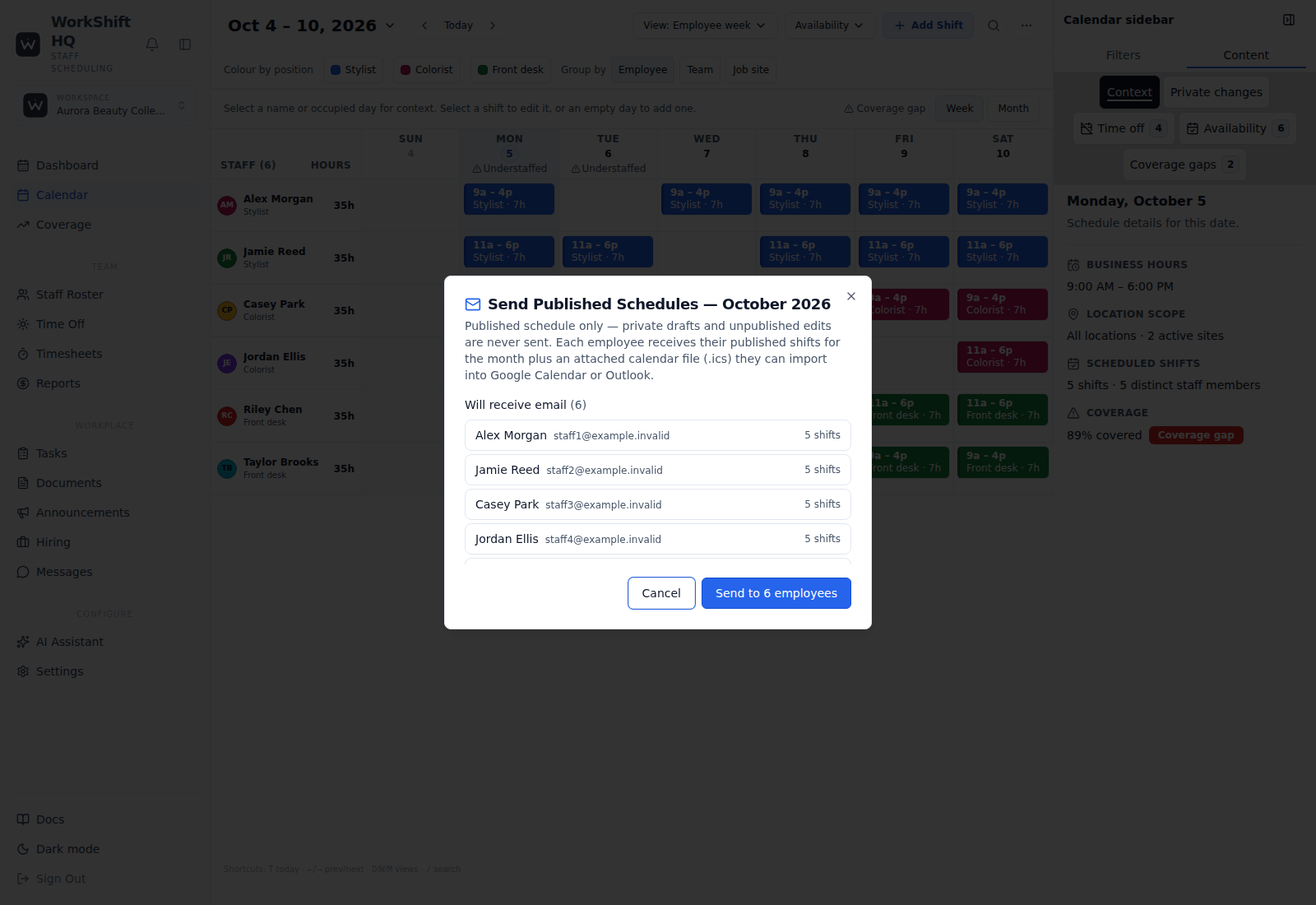
WorkShift HQ provides private ICS calendar feeds for an employee’s own shifts. A staff member can subscribe using a calendar application that accepts ICS feeds; managers can copy or regenerate the feed link. Schedule emails can also include a monthly ICS attachment.
A feed URL is a bearer link: anyone who receives it can read the schedule it exposes. Keep it confidential, and regenerate it if it has been shared unintentionally. This is not a native Google Calendar or Outlook account integration with two-way editing.
Schedule email and downloadable exports
Managers can preview which employees will receive a personal monthly schedule email and which will be skipped, then send emails with ICS attachments through configured email delivery. A verified sending domain and a usable staff email address matter for delivery; sending a request does not guarantee that an inbox accepts the message.
Managers can export schedules as PDF or PowerPoint. Solo has a combined limit of two PDF and PowerPoint exports per calendar month, while Studio and Salon include unlimited exports. Exports are files, not ongoing synchronization.
Optional text notifications
When OneSignal is configured, workspace text notifications are enabled, and staff have opted in, WorkShift HQ can send shift and time-off change texts. The supported scope is operational notifications, not a marketing campaign or a general-purpose chat bridge.
Text messages are not sent just because a business has signed up. Provider setup, the workspace setting, and staff consent all matter. Treat the portal or mobile app as the place to check the current schedule.
Outbound webhooks: connect a service you configure
An owner can configure outbound webhook endpoints for selected events: shifts created, updated, or cancelled; time off approved or declined; and understaffing alerts. WorkShift HQ sends event payloads to an endpoint the business provides.
A generic webhook endpoint can be connected to a workflow built in services such as Zapier or Make, but those products are not native WorkShift HQ integrations. The receiving workflow, endpoint security, data handling, and any third-party subscription are configured and maintained separately by the business.
QuickBooks: keep accounting separate from payroll
An owner configures the Intuit accounting app, authorizes the correct company and environment, and maps employees before approved actual hours can be previewed and explicitly sent as accounting TimeActivity. An accounting time entry is not a payroll payment.
Financial Reports requires owner or individually approved manager pay access. Historical revenue comparisons show their period, accounting basis, currency and missing inputs. Revenue after estimated labor excludes other expenses and is not net profit.
Original paid-sale accounting transfers require separate owner review, source records and customer, item, tax, account and currency mappings. Monthly commission totals are not transferable receipts. Sandbox evidence does not establish production entitlement, and Workforce payroll, wage-rate and commission transfers remain blocked pending verified access.
Subscriptions and connection scope
Billing uses the supported Stripe connection for subscriptions and payment management. Apart from the Slack app described above, the integrations page does not imply native Zapier, Make, Google Calendar, or Outlook two-way sync, and generic webhook configuration is not the same thing as a provider-specific integration.
Try WorkShift HQ with your own team
Build a schedule, share it with your staff, and keep an eye on hours in one place.