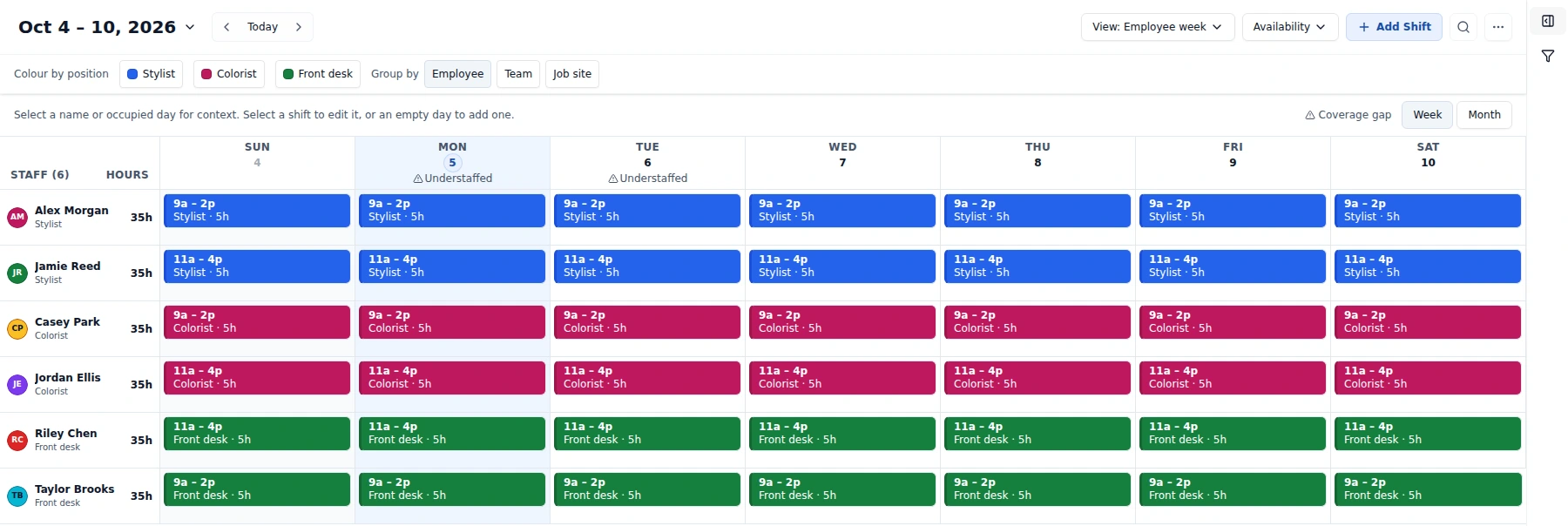
Everyone’s week, together
Employee week puts people and their shifts side by side. Switch to Day, Week (hourly), Month or Workload, and filter by location, position or shift status.
 WorkShift HQ
 · Scheduling for service teams
Understand hours and costs. Build shifts around availability and coverage targets, review privately, then publish the schedule your team follows.
Solo is free for up to 3 staff · No card needed to sign up
Explore the product · See the product tour · Compare plans and limits
Managers and staff can choose their interface language in the web app and staff companion app. The choice is saved on that browser or device, not across your account.
English, Spanish, French, German, Italian, Brazilian Portuguese, Russian, Simplified Chinese, Japanese, Korean, Hindi, Indonesian and Arabic.
Your team’s messages, documents and other user-written content stay in their original language. Interface language does not change currency, scheduling rules or permissions.
What you get

Build shifts around availability, time off, and coverage targets; share each person’s schedule; coordinate team requests; and compare scheduled and recorded hours.
Build, check coverage, review, publish, and share. Staff can check published shifts; email is a separate step.
Place shifts around staff, availability, time off, roles, hours, and locations.
Compare the plan with configured targets and inspect exact gaps before assigning.
Check private edits and conflicts across the workspace before you publish.
Make the reviewed workspace schedule visible to staff.
Staff can check published shifts in the app or portal; email is a separate step.
Plan the week
Start with one row per employee. Bring availability, time off and coverage into the same calendar, then review your private plan before publishing.
Employee week puts people and their shifts side by side. Switch to Day, Week (hourly), Month or Workload, and filter by location, position or shift status.
Review private changes, scheduling conflicts, coverage gaps and scheduled-hours advisories. Publish all changes covers the whole workspace—all dates and locations, not just the filtered view.
Set staffing targets by time window and inspect exact gap times by location on Coverage. Find eligible people without assigning anyone until you choose.
Open Time off or Availability in the collapsible calendar sidebar. Compact position groups expand for employee details; weekly patterns and date-specific availability stay close to your plan.
Give each site its own hours and staffing targets, assign staff and shifts to a location, and let Auto-draft build one location at a time.
Build suggestions from staffing targets and rules, then review what was filled and any gaps.
Bring staff and draft shifts in from a CSV or Excel file, or from another scheduling tool’s export. Preview every row before saving; imported shifts stay private until you publish.
Keep your team aligned
Publish makes the reviewed schedule visible to staff and queues change notices based on their preferences. Send published schedules is a separate resend—private drafts stay private.

Send published schedules emails the published month to eligible recipients with an .ics attachment; personal calendar feeds keep Google Calendar and Outlook up to date.
Staff check published shifts and use the requests and tools you enable. The browser portal needs no app install; ask your manager for the approved companion-app install route.
Keep a request separate from an agreed change: eligible staff respond, and a manager approves before the assignment changes.
Broadcast news with confirm-receipts, assign to-dos on a simple board, and keep handbooks and forms in a shared document hub.
Set up daily, weekly, or monthly checklists for a person, a position, or the whole team, so opening and closing routines have visible assignments and completion records.
Post open roles to a branded public page, collect applications, and move candidates through a simple pipeline, no separate hiring software required.
Understand hours and costs
Use scheduled estimates for planning, review recorded time for attendance, and prepare gross earnings from approved actuals. Each answers a different question.

Staff clock in and out from the portal or the app; timesheets show scheduled vs. actual hours with late-in, early-out, and no-show flags.
Owners and individually pay-approved managers review estimates and labor costs. Location revenue minus scheduled labor excludes other expenses: it is not net profit.
Review approved time, effective pay rules, confirmed commissions and tracked tips, then finalize a versioned gross-earnings CSV. Finalization does not pay staff or file taxes.
Understaffing alerts, day-before shift reminders, and shift-change notices. When enabled and configured, opted-in staff can receive text alerts too.
Export any month as a print-ready PDF or an editable deck for the wall of the break room.
Getting set up
Start with the roster and availability, then build the first week. You can sign up yourself or get in touch with questions.
Name your business. Solo is free for up to 3 staff and needs no card.
Add staff to the roster and invite them to the portal or mobile app.
Staff can enter weekly availability and time-off requests.
Fill shifts, review conflicts, publish all changes, then resend or export the published schedule.
Examples
Common scheduling workflows for service teams.
Industry workflow
Plan availability, position coverage, and review appointment demand beside salon and spa shifts.
Industry workflow
Coordinate schedule changes, staff updates, and manager-approved shift cover.
Industry workflow
Plan coverage by location and review scheduled hours alongside clocked time.
Works with your tools
Review current calendar feeds, communication options, exports, and webhook-based workflows without mistaking a generic connection for a native integration.
Optional connected, read-only appointment overlay with mapped staff and locations. Booking management stays in Square.
Read historical accounting reports with approved pay access, or review and send approved actual hours as accounting time entries. Owner setup and employee mapping are required. This does not run payroll or file taxes.
Install the WorkShift HQ app in your Slack workspace for channel alerts. Linked managers can approve or decline requests from Slack, and staff can check shifts with /workshift.
Subscribe in Google Calendar, Outlook, or Apple Calendar.
Send selected events to your own endpoint, or to a Zapier or Make workflow you set up. These are generic webhooks, not native integrations.
Email schedules to staff. Text alerts require configuration and staff opt-in.
Download print-ready or editable copies of the schedule.
Who it’s for
Plan restaurant and café shifts around service roles, availability, and configured coverage needs.
Schedule opening, floor, stock, and closing roles around staff availability.
Schedule guest-facing, housekeeping, and support roles across the week.
Schedule instructors, front desk, and studio-support roles by availability.
Coordinate front desk, support, and care-team staffing with a clear schedule and dependable communication.
Schedule stylists, practitioners, front desk, and support roles.
Schedule recurring posts around staff availability and requested time off.
Schedule cleaners, team leads, and site-support roles across locations.
For shift-based service teams outside the named industries: configure your own positions, teams and locations.
Choose by active staff and locations, not a feature checklist. Flat CAD tiers with no per-seat charge; annual prices equal ten monthly payments.
Free
Up to 3 active staff, one location and two combined PDF/PowerPoint exports per calendar month. No manager-account cap.
CA$39 / month
Up to 10 active staff, one location and unlimited exports.
CA$99 / month
Up to 25 active staff, unlimited locations and exports.
Annual pricing: Studio CA$390; Salon CA$990. Eligible first paid checkouts include one 30-day trial and require a card; Solo sign-up needs no card. Shared tools remain subject to permissions, setup and provider availability.
Read practical guides for service teams · Free weekly schedule template · Free labor cost calculator
FAQ
Talk to WorkShift HQ about team size, industry needs, or how to get started.
WorkShift HQ