 WorkShift HQ
The product
Plan the week. Keep your team aligned.
Plan the week. Keep your team aligned. Understand hours and costs. WorkShift HQ connects a private staffing plan to the published schedule, daily team coordination and reviewed time.

-
Planning and coordinating daily work. Staff scheduling and coverage | WorkShift HQ
Build a service-team schedule around availability, approved time off, positions, locations, and staffing targets in WorkShift HQ.

Planning and coordinating daily work. Staff schedule sharing and team coordination | WorkShift HQ
Give service teams a shared place to check schedules, request time off, coordinate shift covers, read updates, and find work documents.

Planning and coordinating daily work. Time clock, timesheets, and labor-cost visibility | WorkShift HQ
Review employee clock punches and timesheets alongside scheduled hours, and give authorized owners visibility into labor-cost reports.
Build the week and check coverage
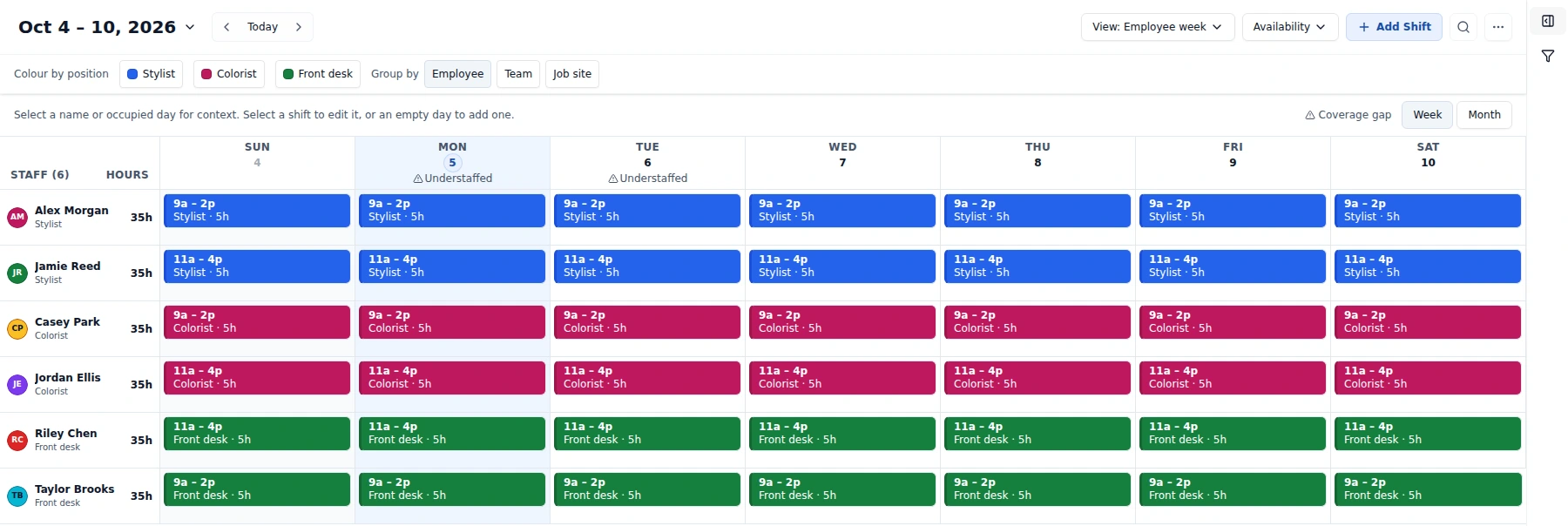
Start in Employee week to plan around positions, locations, business hours, availability and approved time off. View switches layouts; Availability opens availability and weekly patterns. The unified Filters/Content sidebar and interactive status/position legend help you focus the view without changing assignments or publication scope.
Compare the private plan with your staffing targets on Coverage. Dashboard links to that detail through its coverage-percentage card; it does not host the old gap panels or weekly strip. Auto-draft works toward targets for a selected location, not guaranteed full, optimal or fair coverage.
For a gap, Find people lists active staff available and without a conflicting shift for that period. Choosing a name opens the shift form for a manager to review; it does not assign or save the shift automatically.
Keep employees connected to their own work
Staff can check their schedule in the web portal, submit availability and time-off requests, and take part in supported shift-cover workflows. A companion WorkShift HQ Staff app is built for iOS and Android, but public app-store availability is not confirmed here; ask your workspace manager for the current install route. Managers can use announcements, tasks, documents, and messages for the day-to-day information that otherwise gets scattered across channels.
Managers control staff access. Employee accounts can have per-person permissions for features such as the team schedule, coworker contacts, availability, tasks, and viewing their own pay. A cover request or claim is not a completed swap until the manager approves it.
Understand scheduled and recorded time
Employees can record time with the time clock. Timesheets put scheduled and punched time side by side and flag differences such as late clock-ins, early clock-outs, and missed shifts. This gives managers a review workflow; it is not payroll processing.
Owners can review wage estimates and labor-cost reports. A manager sees pay reporting only when an owner has explicitly granted pay access. Staff pay permissions, when enabled, apply to their own pay information rather than the team’s.
Fit the plan to the business you have now
Solo is free for up to three active staff at one location, with two combined PDF and PowerPoint exports per calendar month. Studio is CA$39 per month for up to ten active staff at one location, with unlimited exports. Salon is CA$99 per month for up to 25 active staff and unlimited locations and exports.
A paid-tier checkout requires a payment card. An eligible salon that has not used its trial can receive one 30-day trial on its first paid checkout. These are roster, location, export, and checkout limits—not a manager-account cap. Check the current pricing section before choosing a plan.
Explore the workflows
Follow the manager and staff screens through a coverage gap, a candidate reviewed by a manager, the workspace-wide publication review, and the resulting published schedule in the staff portal.
Try WorkShift HQ with your own team
Build a schedule, share it with your staff, and keep an eye on hours in one place.